Onboarding
Onboard new credit repair clients with one link
Send your client a link. They fill in their information, upload their ID and proof of address, and sign your service agreement. Everything is saved in their file, ready for the first credit report.
How it works
-
Add your service agreement to Crelit once.
-
Create the client and send the onboarding link.
-
The client completes their information, uploads documents and e-signs.
-
You see what's complete and what's still missing in their file.
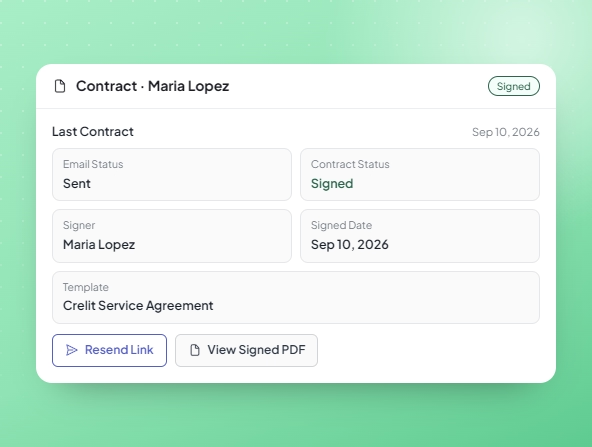
What the onboarding link collects
Personal information, a photo ID, proof of address and the signed service agreement. If something is missing, you see it in the client's file before you start.
Secure ID, SSN and bill files
SSN, ID and bill files are stored encrypted with AES-256-GCM and a unique random IV per value: even a database leak would not reveal their content.
Your service agreement, signed online
Every new client signs an agreement from a unique link, and the signed copy is saved in their file. No printing, scanning or chasing signatures.
Resend the link anytime
If a client doesn't finish, or you need updated documents, send a new link. There's no limit on how many times you can send it.
Frequently asked questions
Does Crelit have a client portal?
No. Clients complete a one-time onboarding link, and you can send a new one whenever you need.
Can clients sign the service agreement online?
Yes. They e-sign it from the onboarding link and the signed copy is saved in their file.
What if a client sends the wrong document?
Send a new link and ask them to upload it again.
More Crelit features
Four parts that share the same client record.